


|
Personal Backup© 2001 - , Dr. Jürgen Rathlev |
 Version 6.4.14.0
Version 6.3.40.0
Version 6.4.14.0
Version 6.3.40.0
|
 Features in detail
|
Add-ons
|
Utilities
|
Tips & tricks
|
|
|
FAQs
|
Translations
|
Online help
|
Tutorials
|
|
|
License
|
Donate |
Search 
|
| |
Personal Backup is a program for saving personal data to any destination folder. This folder may be located on a local fixed or removable drive, on a Windows network server or on an FTP server. Backups can be started either manually or automatically using a user defined time schedule. The program runs under all popular Windows versions.

If you want to upgrade from an older version to the current version, e.g. from 6.3. to 6.4, you must download and install the new version manually. After that, updates for this version will be recognized automatically and installed after confirmation.
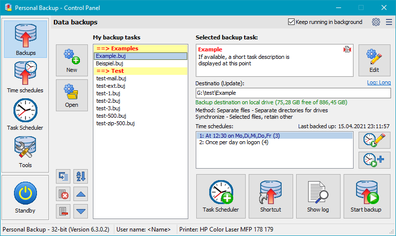
To operate the program, a Control Panel (see screenshot at upper right) is provided. The panel presents a summary of all important information about the user-defined backups in a clearly-arranged form. Just a few clicks are required to change the configurations and start an action.
Supported languages: German, English, Dutch, French, Hungarian, Italian, Polish, Portuguese, Spanish, Turkish, Ukrainian, Russian, and Chinese
Selection of the data to be backed up: The selection of the files to be backed up is made on a by-folder basis. All sub-folders are included automatically, but the user can exclude or include any subdirectories from or in the backup by selection or by filter. Additional criteria are selection by file type, file age and/or file name filter.
Selection of the backup destination: You can select any folder located on a local fixed or removable drive, on a Windows network server or on an FTP server as destination. Within the destination folder, the original drives (C:, D:, etc.) appear optionally as subdirectories named DrvC, DrvD, etc. The original directory structure remains unchanged beneath these folders. Optionally all data can be compressed and/or AES algorithm-encrypted.
Backup tasks:
You can create and
save as a file as many backup tasks
as you wish. Each backup task created in this way can be started manually
or automatically using a time schedule.
The program offers several options for this: at logon, logoff or a
fixed time of day on selected days of the week. Alternatively, it is easy to start a backup using
Windows Task Scheduler.
In addition it is possible to call a one-click backup of a directory with all
its files and subdirectories using the Windows Explorer context menu. The destination
directory and the other settings (backup mode, compression, encryption, etc.) will be taken
from a selectable task (the default task).
Performing a backup: There are different ways to perform a backup. By default during the backup the program checks whether the file to be saved is newer than one already backed up. Only files with newer timestamps and, of course, files not yet backed up are saved. An alternative criterion is to use the archive bit of the files. Experienced users have the option to configure alternating backups consisting of one full and several differential or incremental backups.
Additional functions: In addition there are functions to verify and restore backed-up data and to delete selected files and directories.
Other features: The program offers full Unicode support for desktop and
file copying. Additionally, path-lengths may be longer than 260 characters.
The program automatically checks for updates
at periodic intervals and performs the optional download using a secure Internet connection.
Important note: The program is not suitable for backing up system data.
The 32-bit version of Personal Backup runs under:
* with limitations (more details)
The 64-bit version runs only under:

The search uses a php script by W. Zenk