
|
Personal Backup
|

|
Translations to other languages
Personal Backup basically uses English captions and dialogs. The translation to
German and other languages was done by using
GNU Gettext for Delphi
by Lars B. Dybdahl. This system makes it very easy for anyone to create a translation
to another language. There are just two things needed
(more info):
- The template files (po-files) with all English text strings used in the program
- A simple text editor to insert the translated text strings
Special editors
The translation work is greatly facilitated by the use the powerful Po Editor:
Help needed
People who wish to help by creating translations to other languages are welcomed.
First, they need to download the po templates for Personal Backup.
Note: As Personal Backup was created with the
Delphi 10
development system that has full Unicode support, there are no restrictions
on the character sets able to be used for the translation.
Editing a translation
After downloading the templates you should create
an appropriate work space on your computer:
Recommended directory structure
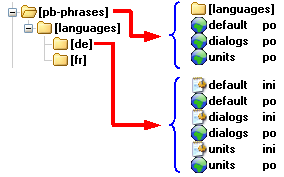
- Create a new directory pb-phrases in My Documents
- Copy all files from the downloaded templates zip to this folder
- Create a subdirectory languages
- There, create subdirectories for each language you wish to support
The further procedure differs depending on whether you want to create a new
translation or edit an existing one
Creating a new translation
- Copy all templates to the subfolder of your language
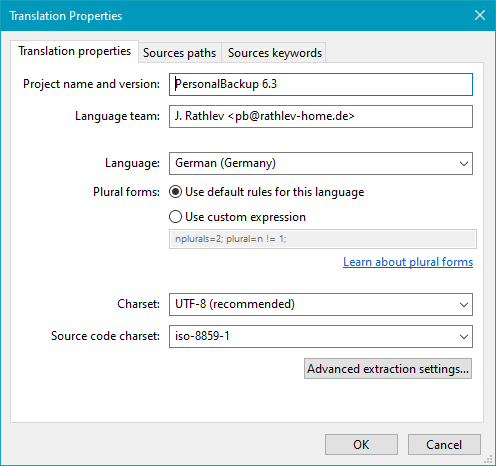
- Open one of these copied po files one after another with a text editor. It is
recommended to use Poedit to do so. Don't forget to edit the po file header.
In Poedit click on Translation - Properties to open the dialog
shown in the screenshot at right.
- Insert the translated texts. Make sure that the translated texts phrases have
similar lengths to the originals so that they will fit into their fields in the desktop
window.
- Open the English version of the file language.cfg (to be found in the
root folder pb-phrases) with any text editor (Notepad or
PsPad)
and remove all "#" signs at the beginning of the lines.
Then translate all language descriptors (not the shortcuts) to your language
and save as new file in the same folder as the translated po files.
- Send the new po files if possible as zip archive back to me as an
. I will then integrate the translation into the program package.
Editing an existing translation
- Download the po files belonging to your language
- Copy all files from the downloaded zip to the subfolder of your language
- Use a text editor or Poedit to adit the translation.
- Send the modified po files if possible as zip archive back to me as an
. I will then integrate the translation into the program package.
Updating translations
Templates will change on new program versions.
GNU Gettext for Delphi
has tools to update the templates and to merge the new templates with the
existing translations. Because of this, only new and changed phrases have to be edited.
I will carry out the merging of the new templates with the previous translation after each update
and will update the translations using the translation portal
DeepL.
This can be done directly via the Internet portal or by using
Poedit
which provides restricted access to DeepL.
If anyone wishes to merge template and translation himself, he will need to download and install
Gnu GetText for Delphi
on his computer after which an entry will be found in the context menu
of all po files for merging them with the templates.
Update process
- Copy the current templates to the directory pb-phrases
- Right-click on the translated po file and select ggmerge
- Select the po template and check Remember settings
- Start file merging
- Enter the editor (e.g. Poedit) to add and change translations
Testing the translation
You can test your translation with an installed version of Personal Backup.
This will ensure that all phrases fit into their fields on the
desktop. Possibly some phrases will have to be abbreviated.
Perform the following steps:
- Open the po file with PoEdit and edit if necessary. When saving the file,
the mo file will automatically be updated.
- Go to the folder where Personal Backup is installed (usually:
c:\Program Files\Personal Backup 6\) on 32 bit systems or
c:\Program Files (x86)\Personal Backup 6\ on 64 bit systems).
- Create a subdirectory <xx>\LC_MESSAGES in the
locale subfolder (administrator rights are required). xx
must be replaced with the two letter language code of your translation (refer to
file language.cfg).
- Copy the following mo files into this new subdirectory (administrator rights required):
default.mo, units.mo, dialogs.mo and, if available, delphi10.mo
and indy10.mo (all files must belong to the language into which you are translating,
see the download section below). Then copy the file language.cfg
which belongs to your language.
- Open the English version of the file language.cfg (to be found in the
Personal Backup program folder) with any text editor (Notepad or PsPad)
and remove the "#" sign at the beginning of the line with your language.
- Restart Personal Backup. You will now find a new menu item for your
language beneath Preferences ⇒ Language to change to your
language.
Downloads:
- Translations for Personal Backup Version 6.4 (Unicode compatible)
- Translations for Personal Backup Version 6.3 (Unicode compatible)
- Translations for Personal Backup Version 5.9 (Unicode compatible)
- Translations for Delphi components and libraries:
- Delphi 10 Seattle*
- Delphi XE2*
- Delphi 2009
- Delphi 7
- Indy 10
* contains full translation for German, Turkish, Ukrainian and Chinese,
partial translations for French (71%), Spanish (22%),
Italian (48%), Portuguese (31%), Dutch (67%), Hungarian (34%), Polish (0%) and Russian (44%)
- Editors for po files:
- GNU GetText for Delphi
 ggt-translate-setup (7.10 MB)