
 |
Personal Backup Version 5.9 |
| © 2001 − 2018, Dr. J. Rathlev |
All backup tasks are saved as files with the extension buj. To edit a task it can be opended and saved anytime. For fast backup execution, a shortcut on the desktop can be created.
 Opening a saved backup task
Load a saved task (.buj file) for editing or execution.
 List of recently-opened tasks
Clicking this button will open the task menu that contains a list of up to 15
of the most recently-opened tasks. Click within the list to load a task.
Right-clicking the icon will allow the list to be edited.
 Saving an edited task
You should save your backup tasks to disk for future use as a file with the extension .buj.
When starting the program for the first time, a task directory is created
at "My Documents\PersBackup". You can change this location using Preferences
⇒ Directories in the main menu.
The backup tasks are saved as readable ASCII files, but modifying such a file
manually with a text editor is not recommended. Instead, edit the task within
the "Personal Backup" program.
Note: provided that a task has not been changed, this button will remain grayed out.
An existing or edited task can be saved under a new filename.
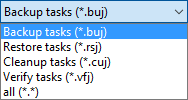
Over time, more and more tasks for backup, restore, cleanup and verify will be accumulating. They are stored in the task directory as files using the extensions buj (Backups), rsj (Restores), cuj (Cleanups) and vfj (Verifications). By clicking the Delete ... function in the main menu any of these tasks can be deleted. At the bottom right of the file selection dialog, you can specify the type of the affected task and then select the file. Associated entries in the task lists will be removed as well.
The directories of an existing task can be added to the list of directories of the currently-opened task.
The selected directory in the task list will be saved as new task.
 Creating a shortcut on the desktop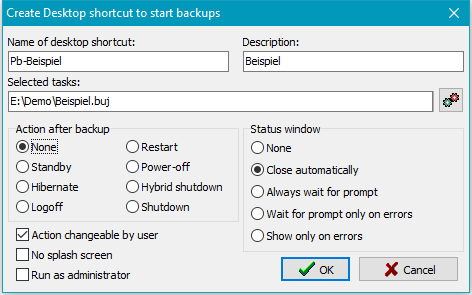
Clicking this button will open a dialog for creating a shortcut on the computer desktop for the currently-opened backup task. In this dialog, you can edit the name of the shortcut, specify the behavior of the status window and define an action to be performed after backup (see also). If this action should not be changed by the user during backup, you can inhibit this by deselecting the relevant option. In addition, you can specify that the Windows User Access Control will start the backup as an administrator (e.g. to use Volume Shadow Copies).
You can select whether the progress window during backup shall be suppressed and how the status window after backup is to be displayed (see more).
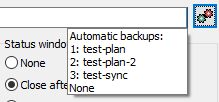
Click the small upper right button to display a list of all configured
automatic tasks. Select the task you want to be started
by the Desktop shortcut. The setting for a subsequent action is made as described
above. Notice that in this case this action cannot be changed later during the backup.
If an alternating schedule was configured for this automatic backup, this will be
performed respective to the current date.
Example: In this way it possible to realize a backup with alternating schedule
with subsequent standby. The user just has to click the so created Desktop shortcut.
By double-clicking the desktop shortcut, created in this way, you can start a
backup and optionally, for example, put the computer into hibernation afterwards.
To start several backups from a desktop shortcut, use the
actions menu to configure.
 Close program
When you exit the program, all preferences including your selections for automatic backup will be saved.
 Move program to background
If at least one of the options for Automatic backups on logoff or at time of day is selected and/or Show icon in notification area is checked, the program will remain running in the background and an icon will appear in the Windows notification area.